Table of Contents
Introduction
Control statements in Java are used to control the flow of execution of a program. By default, Java programs execute statements one after another in a sequential manner. However, real-world programs need to make decisions, repeat tasks, and execute different blocks of code based on conditions. This is where control statements become essential.
Control statements allow a program to:
- Make decisions
- Execute code repeatedly
- Choose between multiple paths
Understanding control statements is crucial for writing logical, dynamic, and efficient Java programs. In this article, you will learn the types of control statements in Java, their usage, simple examples, and common mistakes beginners should avoid.
What Are Control Statements in Java?
Control statements determine which statement will execute next based on conditions or loops. They help implement logic such as decision-making and repetition in Java programs.
Types of Control Statements in Java
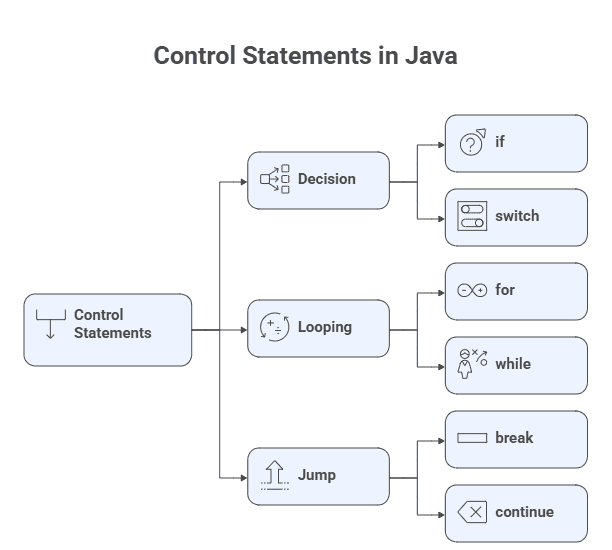
Java control statements are broadly divided into three categories:
- Decision-Making Statements
- Looping Statements
- Jump Statements
1. Decision-Making Statements
Decision-making statements allow the program to execute different code blocks based on conditions.
if Statement
The if statement executes a block of code only when a condition is true.
int age = 20;

if (age >= 18) {
    System.out.println("Eligible to vote");
}
if-else Statement
The if-else statement executes one block if the condition is true and another if it is false.
int number = 5;

if (number % 2 == 0) {
    System.out.println("Even number");
} else {
    System.out.println("Odd number");
}
if-else-if Ladder
Used when there are multiple conditions to evaluate.
int marks = 75;

if (marks >= 90) {
    System.out.println("Grade A");
} else if (marks >= 60) {
    System.out.println("Grade B");
} else {
    System.out.println("Grade C");
}
switch Statement
The switch statement selects execution paths based on a variable’s value.
int day = 3;

switch (day) {
    case 1: System.out.println("Monday"); break;
    case 2: System.out.println("Tuesday"); break;
    case 3: System.out.println("Wednesday"); break;
    default: System.out.println("Invalid day");
}
2. Looping Statements
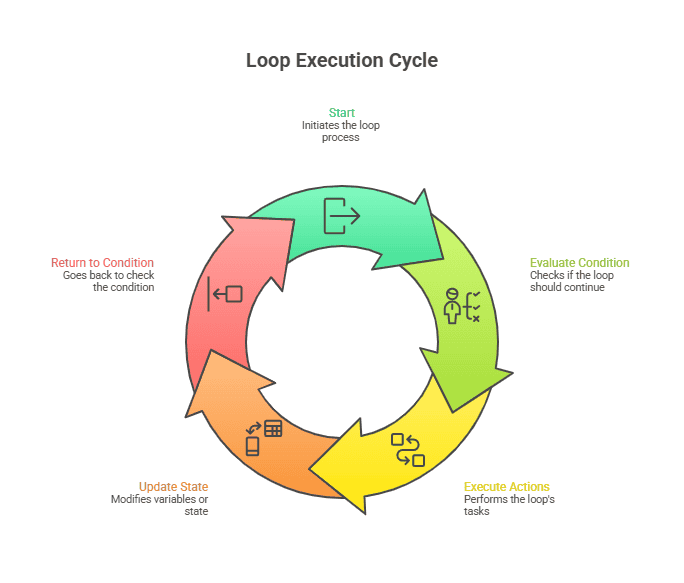
Looping statements are used to repeat a block of code until a condition is met.
for Loop
Used when the number of iterations is known.
for (int i = 1; i <= 5; i++) {
    System.out.println(i);
}
while Loop
Executes a block of code as long as the condition is true.
int i = 1;

while (i <= 5) {
    System.out.println(i);
    i++;
}
do-while Loop
Executes the loop at least once, even if the condition is false.
int i = 1;

do {
    System.out.println(i);
    i++;
} while (i <= 5);
Loop Execution Flow
3. Jump Statements
Jump statements are used to transfer control immediately.
break Statement
Used to terminate a loop or switch statement.
for (int i = 1; i <= 5; i++) {
    if (i == 3) {
        break;
    }
    System.out.println(i);
}
continue Statement
Skips the current iteration and continues with the next one.
for (int i = 1; i <= 5; i++) {
    if (i == 3) {
        continue;
    }
    System.out.println(i);
}
Why Control Statements Are Important?
Control statements help Java programs:
- Make decisions
- Repeat tasks efficiently
- Reduce code duplication
- Implement real-world logic
- Improve readability and structure
Without control statements, Java programs would be limited to straight-line execution.
Common Beginner Mistakes
- Forgetting braces
{}inifstatements - Infinite loops due to missing condition updates
- Missing
breakin switch cases - Confusing
whileanddo-whileloops
Avoiding these mistakes improves code reliability.
Key Takeaways
- Control statements manage program flow.
- Java has decision-making, looping, and jump statements.
ifandswitchare used for decisions.- Loops repeat code efficiently.
breakandcontinuecontrol loop execution.
Java Interview Questions – Control Statements
1. What are control statements in Java?
They control the execution flow of a program.
2. Difference between while and do-while loop?do-while executes at least once, while while may not.
3. When should you use a switch statement?
When multiple conditions depend on a single variable.
4. What does break do?
It terminates the loop or switch immediately.
5. Can we use if inside a loop?
Yes, control statements can be nested.
What’s Next?
Now that you understand control statements, the next step is learning how to organize logic into reusable blocks.
👉 Methods in Java
Learn method declaration, parameters, return types, and examples.
👉 Arrays in Java
Understand how to store and process multiple values efficiently.