Table of Contents
Introduction
When you start writing Java programs, you’ll quickly notice one problem — repetition. The same logic appears again and again. This is where methods come in.
A method in Java allows you to write code once and use it multiple times. Methods help keep programs organized, readable, and easy to change later. Almost every real-world Java application depends heavily on methods.
In this article, we’ll understand methods in a simple and practical way, using easy examples that beginners can relate to.
What Is a Method in Java?
A method is a named block of code that performs a specific task.
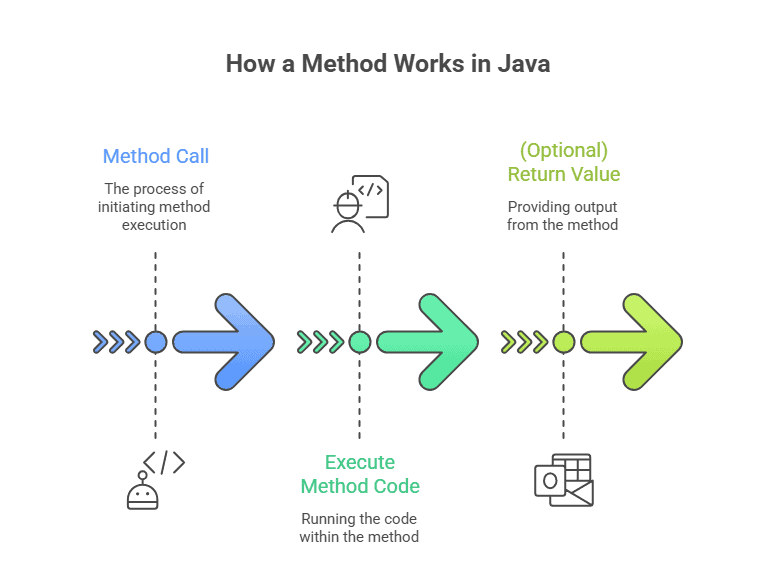
It executes only when it is called.
In simple words:
A method is a reusable piece of code that runs when you need it.
Instead of writing the same code again and again, you put it inside a method and call it whenever required.
Why Methods Are Important in Java
Methods make Java programs:
- Easier to read
- Easier to test
- Easier to maintain
- Less repetitive
Imagine a program without methods — everything inside main(). It would quickly become confusing and hard to manage.
How a Method Works in Java
Basic Syntax of a Method
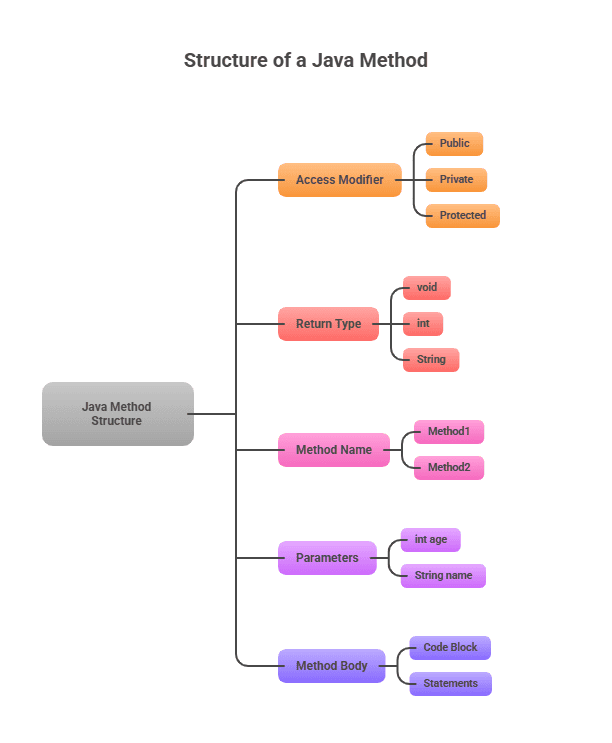
returnType methodName(parameters) {
    // method body
}
Example:
void sayHello() {
    System.out.println("Hello Java");
}
Here:
void→ no value returnedsayHello→ method name- method body → logic inside
{}
Calling a Method
A method does nothing until it is called.
public class Demo {

    static void sayHello() {
        System.out.println("Hello Java");
    }

    public static void main(String[] args) {
        sayHello();
    }
}
Output:
Hello JavaTypes of Methods in Java
Java methods are broadly classified into two types:
- Predefined Methods
- User-Defined Methods
1. Predefined Methods
These methods are already provided by Java.
Examples:
System.out.println()length()Math.max()
System.out.println("Learning Java");You don’t need to write their logic — just use them.
2. User-Defined Methods
These are methods created by programmers based on application needs.
static void printMessage() {
    System.out.println("Welcome to Java");
}
User-defined methods help organize your own logic.
Method Parameters and Arguments
Parameters allow methods to accept data.
static void addNumbers(int a, int b) {
    System.out.println(a + b);
}

addNumbers(10, 20);
int a, int b→ parameters10, 20→ arguments
Return Type in Methods
A method can return a value using return.
static int square(int num) {
    return num * num;
}
If a method does not return anything, use void.
Structure of a Java Method
Static vs Non-Static Methods
Static Methods
- Belong to the class
- Called without creating an object
static void show() {
    System.out.println("Static method");
}
Non-Static Methods
- Belong to objects
- Require object creation
void display() {
    System.out.println("Non-static method");
}
Method Overloading (Basic Understanding)
Method overloading means multiple methods with the same name but different parameters.
static int add(int a, int b) {
    return a + b;
}

static int add(int a, int b, int c) {
    return a + b + c;
}
Java decides which method to call based on arguments.
Key Takeaways
- Methods help avoid repetition in Java.
- A method runs only when it is called.
- Java supports predefined and user-defined methods.
- Methods can return values or be void.
- Static and non-static methods behave differently.
Java Interview Questions – Methods
1. What is a method in Java?
A reusable block of code that performs a specific task.
2. What is the difference between static and non-static methods?
Static methods belong to class; non-static methods belong to objects.
3. What is method overloading?
Same method name with different parameters.
4. Can a method return multiple values?
Not directly, but using objects or arrays.
5. Is main() a method?
Yes, it is a predefined static method.
6. Can a method call another method?
Yes, methods can call other methods.
7. Can we overload the main method?
Yes, but JVM calls only the standard main().
8. Can a method exist without a class?
No, all methods must be inside a class.
What’s Next?
Now that you understand methods, it’s time to learn how Java handles multiple values efficiently.
Arrays in Java
Learn array declaration, initialization, looping, and examples.
Strings in Java
Understand string creation, immutability, and common methods.