If you are learning Java, you must clearly understand the difference between JVM, JRE, and JDK.
This is one of the most common Java interview questions and also a topic where beginners get confused easily.
In this article, we will explain JVM vs JRE vs JDK in simple words, with real-life examples and clear comparisons.
Table of Contents
Why Do We Need JVM, JRE, and JDK?
Java follows the principle:
Write Once, Run Anywhere
This is possible only because Java does not run directly on the operating system.
Instead, it runs using JVM, JRE, and JDK.
Each of them has a different responsibility, which we’ll understand step by step.
What is JVM? (Java Virtual Machine)
Simple Definition:
JVM (Java Virtual Machine) is responsible for running Java programs.
What JVM does:
- Loads Java bytecode (.class file)
- Converts bytecode into machine-level instructions
- Executes the program
- Manages memory (heap, stack)
- Handles garbage collection
👉 JVM makes Java platform independent.
Important Point:
- JVM is platform dependent
- Java bytecode is platform independent
That’s why:
- Windows has Windows JVM
- Linux has Linux JVM
- macOS has macOS JVM
But the same Java program runs everywhere.
What is JRE? (Java Runtime Environment)
Simple Definition:
JRE provides the environment required to run Java applications.
JRE includes:
- JVM
- Core Java libraries
- Supporting files
👉 If you only want to run a Java program, JRE is enough.
Example:
If you install a Java-based banking application on your system, you need JRE, not JDK.
Important Note:
- JRE does not contain the compiler
- You cannot write or compile Java code using JRE
What is JDK? (Java Development Kit)
Simple Definition:
JDK is used to develop Java applications.
JDK includes:
- JRE
- Compiler (javac)
- Debugger
- Development tools
Developers must install JDK to write Java code.
Example:
If you are:
- Writing Java programs
- Working on SAP Hybris
- Building backend APIs
You need JDK.
Relationship Between JVM, JRE, and JDK
This relationship is extremely important for both learning and interviews.
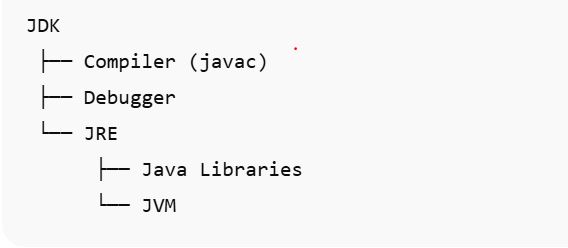
- JDK contains JRE
- JRE contains JVM
JVM vs JRE vs JDK – Comparison Table
| Feature | JVM | JRE | JDK |
|---|---|---|---|
| Full form | Java Virtual Machine | Java Runtime Environment | Java Development Kit |
| Runs Java programs | ✅ | ✅ | ✅ |
| Contains JVM | ❌ | ✅ | ✅ |
| Used for development | ❌ | ❌ | ✅ |
| Used for execution | ❌ | ✅ | ✅ |
| Contains compiler | ❌ | ❌ | ✅ |
Real-Life Example (Easy to Remember)
Think of Java like a car system:
- JVM → Engine (does the actual work)
- JRE → Car (engine + fuel + parts)
- JDK → Factory (builds the car)
You need:
- Car to drive → JRE
- Factory to build car → JDK
Common Beginner Mistakes
- Thinking JVM and JRE are the same
- Installing only JRE when learning Java
- Assuming JDK is needed to run Java apps
- Not understanding platform independence
Avoiding these mistakes will make Java much easier for you.
Java Interview Questions (Very Important)
Q1. What is JVM?
JVM executes Java bytecode and converts it into machine code.
Q2. Difference between JRE and JDK?
JRE is used to run Java programs, while JDK is used to develop Java programs.
Q3. Can Java program run without JVM?
No, JVM is mandatory to run Java programs.
Key Takeaways
- JVM runs Java programs
- JRE provides runtime environment
- JDK is required for development
- JDK ⊃ JRE ⊃ JVM
- This topic is critical for interviews
What’s Next?
➡️ Why Java is Object-Oriented? (Explained with Real-Life Examples)
➡️ Data Types in Java – Explained Simply