
Table of Contents
- Introduction
- What Is a HashMap in Java?
- Why Do We Need HashMap?
- HashMap vs ArrayList
- HashMap vs LinkedHashMap vs TreeMap
- Declaring a HashMap
- Creating and Initializing a HashMap
- Adding Elements to a HashMap
- Accessing HashMap Elements
- Updating Elements
- Removing Elements
- Looping Through a HashMap
- HashMap Size
- Commonly Used HashMap Methods
- How HashMap Works Internally
- How HashMap Handles Collisions
- Advantages of HashMap
- Limitations of HashMap
- Key Takeaways
- Java Interview Questions – HashMap
- What’s Next?
Introduction
In our previous articles, we covered ArrayList and how it stores elements in a simple, ordered, resizable list. But what if you need to store data as key-value pairs — like a username mapped to a user ID, or a product name mapped to its price?
That’s exactly what HashMap is built for.
In this article, we’ll break down HashMap in a simple, beginner-friendly way — how it works, how to use it, and what interviewers commonly ask about it.
What Is a HashMap in Java?
A HashMap is a part of Java’s Collections Framework (java.util package) that stores data in key-value pairs. Each key is unique, and it maps to exactly one value.
import java.util.HashMap;Internally, HashMap uses a concept called hashing to decide where each key-value pair is stored, which makes lookups very fast.
Why Do We Need HashMap?
HashMap is useful when:
- You need to look up a value quickly using a unique key
- You’re modeling real-world key-value relationships (username → user object, product ID → price)
- You want near constant-time (
O(1)) average lookup, insert, and delete - Order of elements doesn’t matter to you
HashMap vs ArrayList
| Feature | ArrayList | HashMap |
|---|---|---|
| Stores | Single values | Key-value pairs |
| Access by | Index | Key |
| Order | Maintains insertion order | No guaranteed order |
| Duplicates | Allowed | Keys must be unique (values can repeat) |
| Lookup speed | O(n) for search by value | O(1) average, by key |
HashMap vs LinkedHashMap vs TreeMap
| Feature | HashMap | LinkedHashMap | TreeMap |
|---|---|---|---|
| Order | No guaranteed order | Insertion order maintained | Sorted by key |
| Performance | Fastest | Slightly slower than HashMap | Slower (O(log n)) |
| Null keys | One null key allowed | One null key allowed | No null keys allowed |
| Use case | General purpose | When order matters | When sorted keys are needed |
Declaring a HashMap
Syntax:
HashMap<KeyType, ValueType> mapName;Example:
HashMap<String, Integer> ages;Creating and Initializing a HashMap
HashMap<String, Integer> ages = new HashMap<>();Initializing with values:
HashMap<String, Integer> ages = new HashMap<>();
ages.put("Riya", 25);
ages.put("Aman", 30);
Adding Elements to a HashMap
HashMap<String, Integer> marks = new HashMap<>();

marks.put("Math", 90);
marks.put("Science", 85);
marks.put("English", 78);
If you put() a key that already exists, its value gets overwritten.
Accessing HashMap Elements
Use get() with the key to retrieve its value.
System.out.println(marks.get("Math")); // 90If the key doesn’t exist, get() returns null. Use getOrDefault() to avoid this:
int value = marks.getOrDefault("History", 0); // returns 0 if key not foundUpdating Elements
Simply call put() again with the same key — it overwrites the existing value.
marks.put("Math", 95); // updates Math from 90 to 95Removing Elements
marks.remove("English");Looping Through a HashMap
Using entrySet() (most common):
for (Map.Entry<String, Integer> entry : marks.entrySet()) {
    System.out.println(entry.getKey() + " : " + entry.getValue());
}
Using keySet():
for (String subject : marks.keySet()) {
    System.out.println(subject + " : " + marks.get(subject));
}
HashMap Size
int total = marks.size();Commonly Used HashMap Methods
| Method | Description |
|---|---|
put(key, value) | Adds or updates a key-value pair |
get(key) | Returns value for the given key |
getOrDefault(key, default) | Returns value, or default if key not found |
remove(key) | Removes a key-value pair |
containsKey(key) | Checks if a key exists |
containsValue(value) | Checks if a value exists |
size() | Returns number of key-value pairs |
keySet() | Returns all keys |
values() | Returns all values |
entrySet() | Returns all key-value pairs |
isEmpty() | Checks if the map is empty |
How HashMap Works Internally
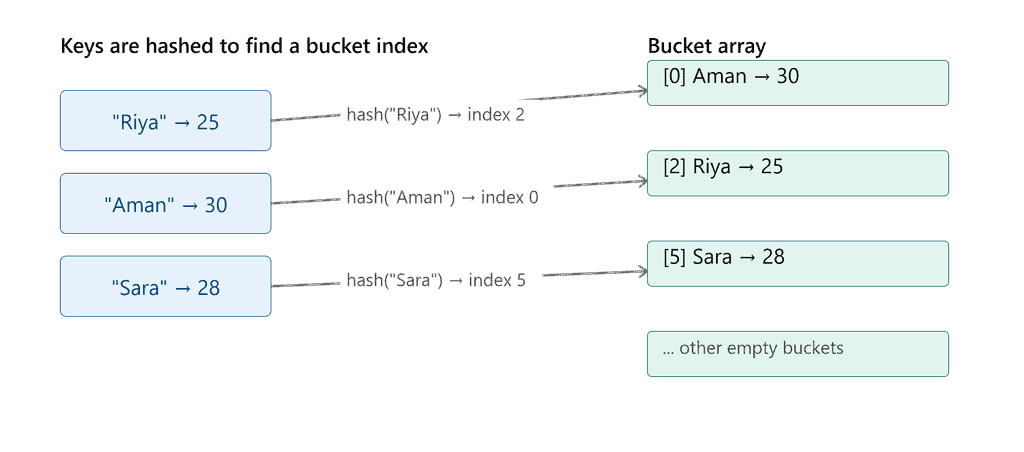
Internally, a HashMap stores data in an array of buckets. When you call put(key, value):
- Java calls
hashCode()on the key to generate a hash value - That hash is converted into a bucket index (using the array size)
- The key-value pair is stored in that bucket
When you call get(key), Java repeats the same hashing process to jump directly to the right bucket instead of scanning every entry — this is why lookups are so fast.
How HashMap Handles Collisions
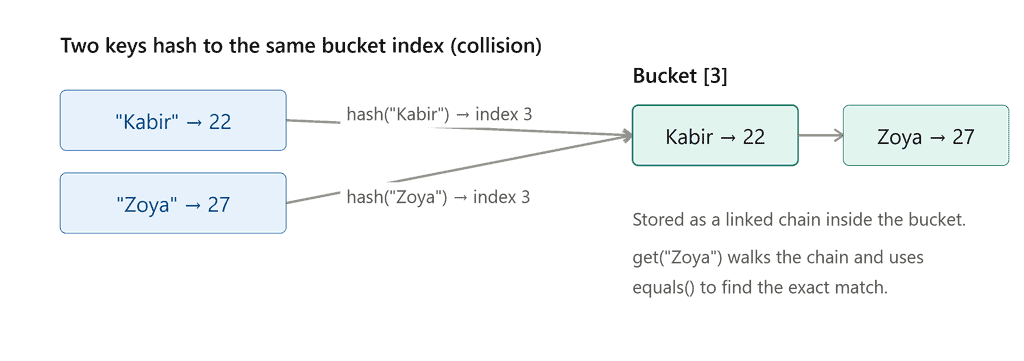
Sometimes two different keys can hash to the same bucket index — this is called a collision.
Java handles this by storing multiple entries in the same bucket as a linked list (or a balanced tree, if the bucket gets too large in Java 8+). When you call get(key), Java goes to the correct bucket and then uses equals() to find the exact matching key among the entries stored there.
Advantages of HashMap
- Very fast average-case lookup, insert, and delete — O(1)
- Flexible key-value storage for real-world data modeling
- Allows one null key and multiple null values
- Widely used and well-optimized in the JDK
Limitations of HashMap
- No guaranteed order of elements
- Not thread-safe by default (use
ConcurrentHashMapfor multi-threaded code) - Worst-case lookup can degrade if many keys collide
Key Takeaways
- HashMap stores data as unique key-value pairs.
- Lookups, inserts, and deletes are O(1) on average, thanks to hashing.
- Keys must be unique; values can repeat.
- Use
entrySet()orkeySet()to loop through a HashMap. - Collisions are handled internally using chaining.
Java Interview Questions – HashMap
1. What is a HashMap in Java? A collection that stores data as unique key-value pairs, using hashing for fast access.
2. What is the time complexity of HashMap operations? O(1) on average for get(), put(), and remove(); O(n) in the worst case with many collisions.
3. Can a HashMap have duplicate keys? No, keys must be unique. If you put() an existing key again, the value is simply updated.
4. Can a HashMap have a null key? Yes, HashMap allows exactly one null key and multiple null values.
5. How does HashMap handle collisions? By storing multiple entries in the same bucket as a linked list, or as a balanced tree when a bucket has many entries (Java 8+).
6. Is HashMap synchronized? No. For thread-safe operations, use ConcurrentHashMap or Collections.synchronizedMap().
7. Difference between HashMap and Hashtable? Hashtable is synchronized and doesn’t allow null keys/values; HashMap is not synchronized and allows one null key.
8. What is the default initial capacity and load factor of a HashMap? Default initial capacity is 16, and default load factor is 0.75.
What’s Next?
Now that you understand how HashMap works, the next logical step is HashSet, which is built on top of HashMap and used when you only need unique values without key-value pairs.
HashSet in Java Learn how HashSet uses HashMap internally to store unique elements.